Schedules will not activate until the first member of office staff has scanned their badge on the front door reader.
Elementary schools are scheduled to unlock from 8:00AM - 4:30PM Secondary schools are scheduled to open from 7:00AM to 3:30PM ### Temporary Override Any member of office staff can deactivate the schedule by double-scanning their badge on the front door. Doors that are scheduled to unlock will also lock if the lockdown button is pressed. # LockdownA lockdown of the electronic door system **is not** tied to a Raptor lockdown.
### What to Expect When a site enters lockdown, electronic doors will no longer unlock. Any card readers with a screen will also blink red and display a lockdown message. Campus camera administrators will also receive an email alert that the lockdown button has been pressed. When a site exist lockdown, all systems will return to normal behavior. ### Initiate a Lockdown A lockdown can be initiated in three ways - Press the lockdown button in the reception area - Press the lock button on a Unifi key fob - Activate the lockdown relay in the web UI 1. Log in to [https://pisd.ui.com](https://pisd.ui.com) 2. Click on the console labeled **\[campus\] Security** 3. Click the Lockdown button on the left side of the page 4. The circle to the left of the word Lockdown should turn green 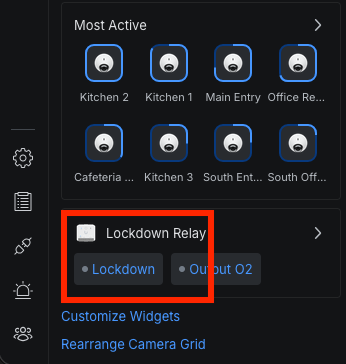 ### Clear Lockdown To clear a lockdown 1. Log in to [https://pisd.ui.com](https://pisd.ui.com) 2. Click on the console labeled **\[campus\] Security** 3. Click the Lockdown button on the left side of the page 4. The circle to the left of the word Lockdown should turn gray  # Standard Door Policies ### Elementary Campuses #### Full Access Office staff and some district staff have access to every door in the building. #### General Access Campus staff and district staff that serve many campuses have access to doors that grant access to the main areas of the building excluding the office, kitchen, and any other special location. #### Kitchen Access Food service staff have access to campus kitchens #### Exceptions At Canup ECC, people with General Access have access to the office during business hours. ### Secondary Campuses #### Full Access Office staff and some district staff have access to every door in the building. #### General Access Campus staff and district staff that serve many campuses have access to doors that grant access to the main areas of the building excluding the office, kitchen, and any other special location. #### Kitchen Access Food service staff have access to campus kitchens #### Fine Arts Access Fine arts staff have access to the fine arts areas