
Lockdown Buttons
What to Expect
When a site enters lockdown, electronic doors will no longer unlock. Any card readers with a screen will also blink red and display a lockdown message. Campus camera administrators will also receive an email alert that the lockdown button has been pressed.
When a site exist lockdown, all systems will return to normal behavior.
Initiate a Lockdown
A lockdown can be initiated in three ways
- Press the lockdown button
- Press the lock button on a Unifi key fob
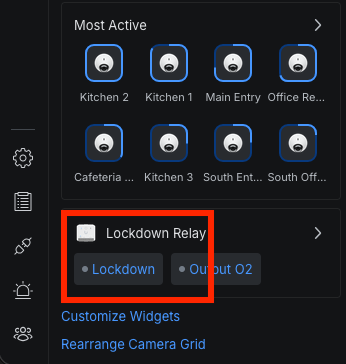
- Activate the lockdown relay in the web UI
- Log in to https://pisd.ui.com
- Click on the console labeled [campus] Security
- Click the Lockdown button on the left side of the page
- The circle to the left of the word Lockdown should turn green
Clear Lockdown
To clear a lockdown
- Log in to https://pisd.ui.com
- Click on the console labeled [campus] Security
- Click the Lockdown button on the left side of the page
- The circle to the left of the word Lockdown should turn gray